Nik Dfine Noise Reduction Software: Nik Collection By DXO
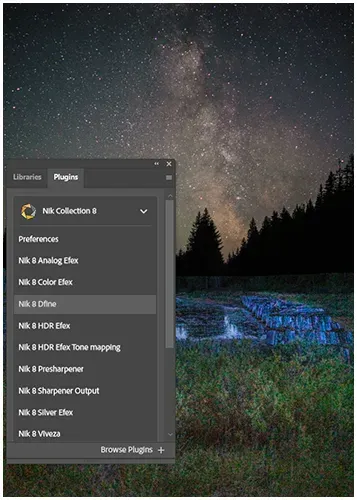
One of my secret weapons to reduce the noise in my photos is Nik Dfine. It’s my go-to plugin, and honestly, it’s been an absolute game-changer in my digital photographs.
What makes Nik Dfine so special in the often-tricky world of noise reduction? Well, it’s remarkably good at fighting off that pesky digital noise without sacrificing the crucial details that make an image pop.
It’s not just about superior noise reduction anymore; it’s faster and seamlessly integrates with all my different cameras and settings. This versatility is why I confidently recommend it to any photographer looking to elevate their art.
The software offers targeted noise elimination while preserving image detail.
The software is compatible with a variety of camera models.
Utilizes U Point technology for enhanced local adjustments.
Designed for both beginners and professionals.
Table of Contents
What is Nik Dfine, and how does it work?
Nik Dfine is one of the top tools in the Nik Collection plugins. It uses smart algorithms to turn photos into depth maps, automatically spotting and removing noise. Making your photos cleaner and crisper.
Understanding the Basics of Nik Define
It’s smart technology that finds and removes digital noise. Keeping your photos high quality and showing the results right away. You can also adjust it to focus on noise in certain colours.
Enhancing Your Photography with Nik Software
Dfine makes editing photos easier by allowing you to save the settings for quick use. It uses advanced technology to remove noise fast, often with just one click.
Unique Features in Noise Reduction
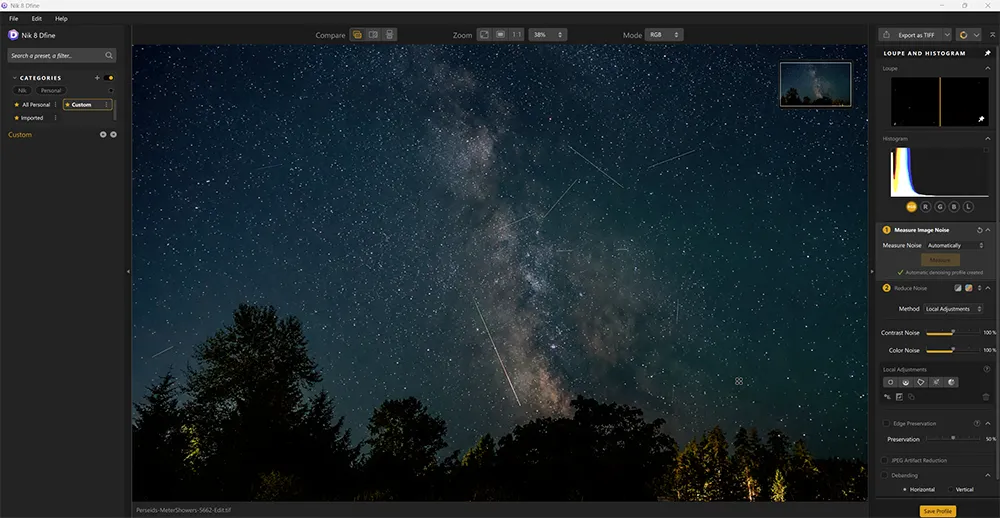
U Point™ tech. It enables you to precisely target noisy areas and make local adjustments. You can adjust colour and contrast noise with ease.
It also has:
Automatic or manual analysis for global or selective noise corrections.
Specific noise correction brushes for use in Adobe Photoshop.
JPEG artifact reduction algorithms to mitigate noise reduction artifacts.
Debanding tools to reduce banding effects in flat, dark, or solid areas.
Looking to stretch your budget? We’ve got good news! Use the SPECIAL code whosaid15 for an extra 5% off
What Are the Benefits of Using Nik Dfine
Nik Dfine is a leading noise reduction software. It offers tools to improve your digital photos.
Key Improvements in the Latest Version
The newest Nik Dfine version comes with over 200 premium presets for quick noise reduction. The U Point™ technology makes local adjustments easy, with smart selections all in one click.
Selective Tones palette for precise control over Highlights, Shadows, Midtones, and Blacks
New Control Points that can stretch into ellipses for more accurate selections
Polygonal Tool for precise area selection
Maximizing Your Workflow with Nik Dfine
Nik Dfine has a ‘Last Edit’ feature for quick reapplication. You can also edit non-destructively, keeping all changes in files in Lightroom Classic.
Batch editing is easier with smart copy-and-paste in Lightroom Classic. Meta Presets automate complex edits, combining filters and settings. Making professional results easier and streamlines your editing process.
Comparing Nik Dfine with Other Noise Reduction Software
Nik Dfine is a standout in image editing tools. It has a gentler noise reduction algorithm than some rivals. This makes it a top pick for photographers who want a natural look.
Nik Dfine vs. Lightroom
Adobe Lightroom is well-liked, but Nik Dfine has its own perks. Dfine works on single images with a profile, not camera presets. This method lets you fine-tune noise reduction, especially in tricky spots like skies or skin.
Lightroom’s noise reduction might blur details, especially at high ISOs. Dfine, on the other hand, keeps sharpness while cutting down noise.
Feature
Nik Dfine
Lightroom
Noise reduction approach
Profile-based
Preset based
Detail preservation
High
Moderate
Nik Define Vs Topaz AI Noise Reduction
I’m one who constantly battles the challenges of low-light photography, therefore I’ve had my fair share of experience with various noise reduction tools. While I’ve certainly explored the capabilities of AI-powered solutions like Topaz AI Noise Reduction, for me, Nik Dfine consistently delivers a level of control and precision that truly sets it apart.
Here’s how I see them comparing:
Nik Dfine: This is my go-to for its surgical accuracy. Its famed U Point technology allows me to make incredibly localized adjustments, precisely targeting noise in specific areas while safeguarding crucial details. It allows me to fine-tune both contrast and colour noise without the “blanket effect” that can sometimes accompany other solutions. For photographers who demand a hands-on approach and meticulous refinement, Dfine is a masterclass in control.
Topaz AI Noise Reduction: Topaz leverages impressive artificial intelligence, trained on vast datasets to intelligently differentiate noise from detail. This often results in remarkably clean images, especially with extremely high ISO shots, and can even appear to enhance detail as it denoises. It’s a powerful tool for those seeking an automated, intelligent solution, with various AI models adapting to different noise types.
While Topaz AI Noise Reduction certainly offers an impressive automated workflow, the true artistry in noise reduction, for me, often lies in the control that Nik Dfine provides. Its ability to precisely target and eliminate noise while preserving textures and details is simply unmatched.
Dfine gives me the confidence to push my camera’s limits in challenging light, knowing that it will retain the authentic character of my shots without over-smoothing or introducing an artificial look.
This granular control, combined with its seamless integration within the Nik Collection, makes it an indispensable tool for achieving truly professional, clean, and detail-rich photographs.
Understanding Different Types of Noise and Their Impact
Digital noise can really mess up your photos, especially in dark places. Knowing about different types of noise is almost mandatory in this digital age.
What is High ISO Noise and How to Combat It?
High ISO noise looks like grainy specks in your photos, especially in dark areas. It gets worse when you use higher ISO settings, especially with smaller camera sensors. For example, noise can be too much at ISO 2400 for small cameras.
To fight this, I use the lowest ISO setting at all times. Also, shoot in RAW format. This gives you more options for fixing noise later.
Identifying Horizontal and Vertical Banding
Banding noise shows up as lines or stripes in your photos. It’s more obvious in dark areas or when you brighten images in post. Nik plugins have tools to fix banding, keeping your photos awesome without those annoying lines.
How to Measure the Amount of Noise in Your Images?
Measuring noise helps you know when to reduce it. Most pros aim for a signal-to-noise ratio of 30dB. You can check for noise by looking at shadows at 100% zoom. Or, use your software’s histogram to spot noise patterns.
Remember, bigger prints (like 24×36 inches) show noise more than smaller ones (like 4×6 inches).
Camera Type
Accetable ISO
Noise Threshold
Compact / Smart Phone
Up to 200
Visable at ISO 400
Crop Sensor DSLR
Up to 800
Noticeable at ISO 1600
Full frame DSLR
Up to 3200
Manageable at ISO 6400
Tips for Achieving Optimal Results with Nik Dfine
Learning to use Nik Dfine can really boost your photography skills. This software lets you control noise reduction with precision. This means you can make your images look better without losing quality.
Best Practices for Local Adjustments
Nik Dfine stands out because of its selective noise reduction. You can adjust noise in certain parts of your photo, keeping other areas sharp. Use Control Points to pinpoint noisy spots and leave clear areas untouched.
How to Preserve Image Sharpness While Reducing Noise?
It’s important to find the right balance between reducing noise and keeping your image sharp. Start with Nik Dfine’s default settings for most photos. But, if your photo has a lot of noise, you might need to try different settings.
Remember, Nik Sharpener can help bring back detail after you’ve reduced noise. But use it carefully to avoid adding more noise to your photo.
My Final Thoughts on Nik Dfine
Having explored the depths of noise reduction tools, from the automated brilliance of AI to the subtle precision of traditional software, I always find myself returning to Nik Dfine. For me, it’s more than just a plugin; it’s an indispensable partner in my pursuit of photographic excellence.
Its unparalleled control, particularly with the U Point technology, gives me the artistic freedom to precisely refine my images, ensuring every detail and texture is preserved.
When I’m in challenging low-light situations, knowing I have Nik Dfine in my toolkit gives me the confidence to push boundaries, secure in the knowledge that my final images will be clean, sharp, and truly reflective of my vision, without ever sacrificing that authentic look.
Choosing the right noise reduction tool depends on your needs and how you work. Nik Dfine is a great choice for many, especially those who need control and precision.