Grand Opening & Black Friday Sale  =  50% Off 

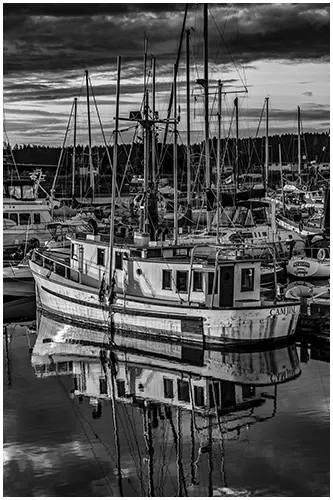
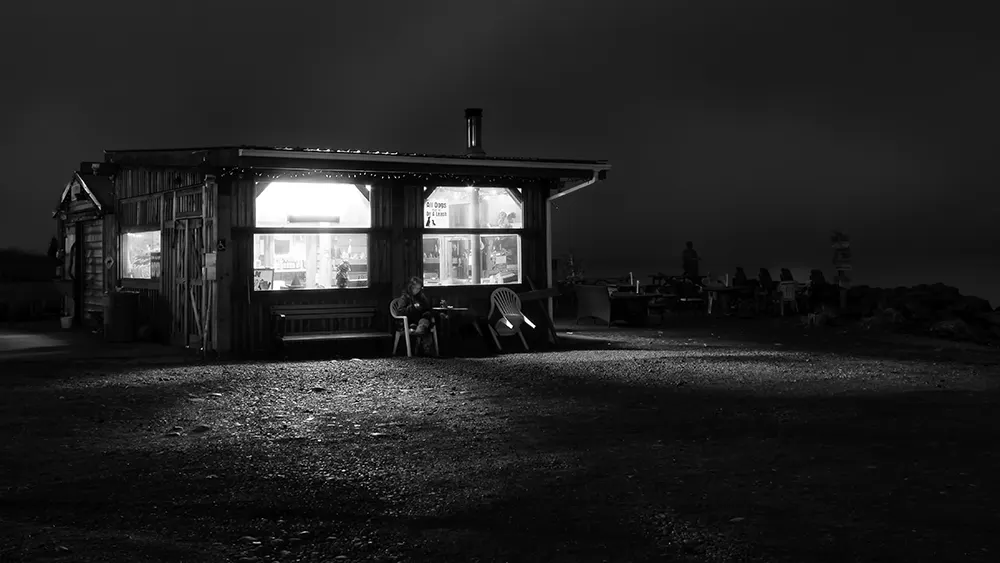
Example of using Nik Silver Efex on a digital photo.
Down Arrow

Black and White Photo Editing with Nik Silver Efex 

Looking to turn your digital photos into stunning black and white? Have you heard of Nik Silver Efex, the software that was inspired by the golden days of darkroom techniques? Well, it might be what you need. It’s my top pick for black and white perfection.

Nik Silver Efex by DXO combines the charm of film with digital editing’s precision. 

Using Nik Silver Efex, you’re not just making photos black and white. You’re entering a realm where you can mimic 20 classic films, like Kodak Tri-X 400 and Ilford Delta 100. The software has 41 high-fidelity film grains, crafted with DxO’s unique calibration systems.

Key Takeaways

  • Nik Silver Efex is a top choice for professional black-and-white photos.
  • The plugin offers emulation of 20 legendary films.
  • Users can access 41 high-fidelity black-and-white film grains.
  • Provides precise control over tones, contrast, and grain.
  • The software integrates seamlessly with Photoshop and Lightroom.
  • Nik Silver Efex is part of the affordable Nik Collection suite.

Table of Contents

What is Nik Silver Efex and How Does It Work?

Nik Silver Efex is a powerful plugin for making stunning black and white images. It’s part of the Nik Collection, a set of photo editing tools used by pro and amateur photographers. 

Understanding the Basics

Transform your colourful digital photos into beautiful monochrome works of art. Silver Efex has several easy-to-understand tools and adjustment panels. Choose from one of the 20 legendary presets, like Kodak Tri-X 400 and Ilford Delta 100.

How Does Nik Silver Efex Pro 3 Enhance Your Images?

Nik offers 41 high-fidelity black-and-white film grains. Easily adjust structure, shadows, midtones, and highlights with precision control. Use the ClearView filter to make your portraits stronger and reveal those subtle details.

Exploring the Nik Collection of Plugins

The Nik Collection’s new dockable panel gives you instant access to the full suite in Adobe Photoshop. Making editing quick easy and fun. 

  • Control Points: U-Point technology for selective adjustments
  • Unique Sliders: midtones, dynamic brightness, soft contrast

Create Stunning Black and White Images

Our tutorial will guide you through the process of creating captivating monochrome images.

Step-by-Step Guide

To begin your journey in professional black and white editing, follow these steps:

  • Import your image from Photoshop or Lightroom, or use the standalone feature.
  • Choose a preset as a starting point.
  • Adjust contrast and brightness.
  • Fine-tune tonal ranges
  • Apply film grain effects.
  • Use control points for selective adjustments.

Best Practices for Editing with Silver Efex

When enhancing your black and white photos, keep these tips in mind:

  • Protect highlights during conversion for better results.
  • Use UPoints to create masks based on the original colours and tones.
  • Experiment with black-and-white film grains.
  • Aim for distinct tonal separation to avoid a “grey mush” effect.
  • Utilize local adjustments in side panels for precise editing.

Looking to stretch your budget? We’ve got good news! Use the  SPECIAL code  whosaid15 for an extra 5% off

Best Presets for Nik Silver Efex Pro?

Presets, did I mention there are lots of presets to help boost your black and white photos? Let’s look at some top presets and how to tweak them for your unique style.

Top Presets for Achieving That Film Look

It’s easy to mimic the classic film styles. With a click of a button, you can emulate that Hollywood glamour look from the 25th Anniversary Portrait collection. It’s a favourite of mine! It brightens your photos, boosts contrast, and changes those drab colour photos to black and white art.

  • Hollywood Glamour: Increased brightness, enhanced contrast.
  • Fine Structure: Enhanced local contrast, clearer details.
  • Highlights Protection: Prevents the clipping of bright areas.

How to Customize Presets Your Own Presets

To get the best out of the software, start by tweaking brightness and contrast. Adjust structure for better local contrast and use highlights protection to avoid overexposure. Add a vignette as a final touch with various effects or manual adjustments.

  • Adjust brightness and contrast.
  • Fine-tune structure for local contrast.
  • Use highlights protection.
  • Experiment with vignette effects.

Presets are just the beginning. Keep experimenting and tweaking to find your unique style. With practice, you’ll become a pro at creating stunning images that catch everyone’s eye.

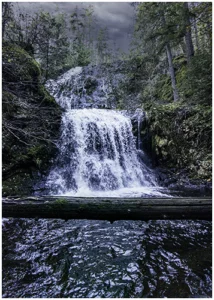
Black and white image converted using Nik Silver Efex.

Use Control Points for Selective Adjustments?

Control points are the backbone of the suite, letting you make precise changes to your black and white photos. 

Introduction to Control Points and Their Benefits

Control points Use UPoint technology to create masks based on colour and contrast. Assisting you in adjusting specific parts of your image.

Techniques for Using Control Points Effectively

To use control points well, place them carefully on your image. You can resize them by adjusting the slider from their centre. Different filters have different sliders for adjustments, letting you fine-tune your edits.

Creating Local Adjustments with Control Points and Lines

Control points, enhances and flexibility in your editing your photos

Control Point FeatureDescriptionBenefits
ResizingAdjust size using slider from centrePrecise area selection
DuplicationUse duplicate button or Option (Alt) keyQuickly apply similar adjustments
GroupingControl multiple points from oneEfficient editing of related areas
Mask viewDynamic visualization of affected areaAccurate adjustment placement

Workflow Benefits of Using Nik Silver Efex?

As a photographer, you can get a lot out of this software. 

Integrating Silver Efex into Your Workflow

Nik Silver Efex is a powerful tool for turning colour photos into black and white. Easily add it into your editing workflow within Lightroom or Photoshop, then send it to Silver Efex as a plugin. Once inside, use its sliders to adjust brightness, contrast, and structure. 

It also has film-style presets that help give your photo a classic black and white look. When you’re done, just save the changes and return to your editing program to finish up. It’s a simple and elegant way to convert your digital art to black and white. 

Non-Destructive Editing with Nik Software

Yes, the software supports non-destructive editing, which ensures that your original photos remain safe and unchanged. 

The software applies edits on a duplicate, so you can go back and make changes easily. If you’re using it with Lightroom, it saves the new black and white version as a separate file, keeping your colour photo untouched. It simplifies the process of experimenting with various styles without jeopardizing your initial work.

Emulate Black and White Film

Remember the good old days of black and white photography? Well, me neither, but we can simulate/imitate the masters like Ansel Adams and Henri Cartier-Bresson. 

Understanding Film Types for Black and White Photography

Silver Efex Pro has emulations of famous black-and-white films. For example, Kodak TRI-X 400 is known for its rich, grainy texture. You can try Adox Silver Max 21 for fine grain and deep blacks. Alternatively, apply a Bergger BRF 400 Plus to achieve moderate contrast in those landscape photos.

Techniques for Achieving Film Grain Effects

To get film grain, Silver Efex lets you adjust grain size and roughness. The grain control feature helps you fine-tune the look. You can make it very grainy or sharp and clean.

For a Leica M7 rangefinder camera feel, use the Kodak TRI-X 400 preset. Adjust the grain to match your vision.

Its film emulation is unparalleled, even though some people might search for a Nik Silver Efex substitute. By mastering these techniques, you’ll make stunning monochrome images. They will capture the timeless beauty of film photography.

Conclusion

If you love black and white photography and you are looking for that perfect photo editor, take a good look at Nik Silver Efex. It gives your photos that classic film look with pro-level control, no darkroom needed. Regardless of your skill level, Silver Efex can elevate your images to a new level.

Don’t miss out; your best black and white shots are waiting to happen!

Frequently Asked Questions

Yes, Silver Efex is worth it if you want powerful black and white photo editing tools. It offers advanced controls, film emulations, and precise tonal adjustments that go beyond basic software, making it a favourite among serious photographers.

Is Nik Silver Efex free? Nik Silver Efex is not free. It’s part of the DxO Nik Collection, which requires a paid license. However, an older free version from Google may still be available online, but it lacks the latest features and updates. You can download the Nik Collection and trial the software for 30 days. 

Our Latest Blogs