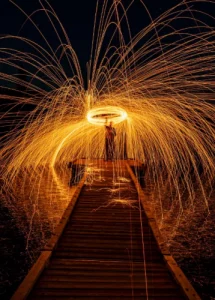
Spinning Fire: A Guide to Steel Wool Photography
I think steel wool photography creates some of the most amazing images you can capture
Share the Love This Valentine’s Day – 25% Off




Have you ever captured that perfect image, only to have the final photo disappoint you? I know the feeling. It’s frustrating when your vision doesn’t come through in post-processing. Here’s were DxO PureRAW and the Nik Collection by DXO can help, I know it did for me.
These tools are my go-to for better image quality and noise reduction. Imagine making every photo sharp and clear, showing off your creativity and skills.
PureRAW takes your original RAW files and applies its proprietary technologies (DeepPRIME, DeepPRIME XD, and optical corrections) to produce an enhanced RAW file (a Linear DNG).
This Linear DNG retains all the flexibility of a standard RAW file for further editing, but with significantly reduced noise, improved detail, and corrected optical imperfections (like lens distortion, chromatic aberration, and vignetting) already baked in.
The main idea is ‘Better RAW Files First.’ It’s like building a house on a solid foundation. Optimizing RAW files first makes editing easier and your photos way better. This way, you get great results faster.
DxO PureRAW offers two ways to improve your RAW files, including options for exporting to DNG format. It’s great for photographers who like to work alone or with Lightroom Classic. PureRAW meets your needs.
Using PureRAW as a separate program is straightforward.
For many photographers, integrating PureRAW directly into Lightroom Classic is the most efficient workflow.

Looking to stretch your budget? We’ve got good news! Use the SPECIAL code whosaid15 for an extra 5% off
| Usage Mode | Key Features | User Experience |
|---|---|---|
| Standalone Application | Complete RAW optimization tools, independent of other software | Users love the straightforward process and significant improvements in image quality without leaving the application |
| Lightroom Classic Plugin | Seamless integration with Lightroom, enhanced editing workflow. | Photographers appreciate the combined strengths of PureRAW processing and Lightroom’s extensive editing options |
DxO PureRAW offers solutions for any workflow. It's great for those who work alone or with Lightroom Classic. PureRAW makes RAW file optimization easy and effective.
...Bob
Many of us use PureRAW as the very first step after importing their RAW files, especially for images shot in challenging lighting conditions (high ISO, low light) or where maximum detail is desired. It essentially “supercharges” your RAW files before you dive into the creative aspects of editing.
Are you curious about the differences between DxO PureRAW and Adobe Lightroom, especially in terms of export capabilities? In my opinion, both are top-notch, but they meet different needs.
DxO PureRAW shines with its DeepPRIME tech. This AI boosts noise reduction and increases detail and colour. Lightroom uses AI for editing, focusing on making your workflow smoother with its many tools and presets.
PureRAW mainly works on pre-editing, getting your RAW files ready for more tweaks. Its AI helps with noise and detail. Lightroom, however, is for full editing, from organizing to final touches.
In summary, DxO PureRAW and Lightroom serve distinct purposes in the editing process. PureRAW starts with great initial improvements. Lightroom handles the whole editing journey, working well with Adobe products. Your choice depends on your editing needs.
| Table Header | PureRaw by DXO | Adobe Lightroom |
|---|---|---|
| Workflow Differences | Pre-editing focus, exceptional noise reduction | Comprehensive editing suite, robust cataloging. |
| AI Features | DeepPRIME technology | Extensive AI editing tools |
| Image Quality | High detail, colour accuracy, and noise reduction | Flexible, customizable results |
Looking at the workflow differences, each tool has its strengths. PureRAW excels in initial image enhancements. Lightroom offers a wide range of editing options. Know your needs when choosing the right tool for your photography, whether it's cameras and lenses or software like DxO PhotoLab.
...Bob

The Nik Collection is a set of 8 powerful photo editing plugins. They help speed up your post-processing with creative tools and precise adjustments. With eight different tools, they cover all aspects of photo editing, from colour correction to special effects.
Combine the power of DxO PureRAW with the renowned Nik Collection to achieve truly professional-looking photos. This seamless integration streamlines your workflow, allowing you to focus on creativity after PureRAW delivers a perfectly optimized base image.
Here’s a look at the 7 powerful tools within the Nik Collection and what each one brings to your editing table:
| Plugin | Effects |
|---|---|
| Analog Efex Pro | Recreates classic camera and vintage film looks with authentic imperfections like light leaks and film grain. |
| Color Efex Pro | Offers extensive creative filters and colour enhancements to adjust colour, tone, and contrast, or apply unique recipes. |
| Nik Dfine | Specializes in advanced noise reduction, effectively removing digital noise while preserving crucial image details. |
| HDR Efex Pro | Merges multiple exposures into a single High Dynamic Range (HDR) image, revealing incredible detail in shadows and highlights. |
| Silver Efex Pro | The industry-standard tool for black-and-white photography providing precise control over monochrome conversions, tones, and contrast. |
| Sharpener Pro | Enhances image sharpness. Includes Presharpener for RAW optimization and Output Sharpener for fine-tuning based on output (screen/print). |
| Nik Viveza | Provides intuitive and precise local adjustments to color and tone using U Point technology, without complex masking. |
By first preprocessing your images with PureRAW for optimal sharpness and noise reduction, then moving into the Nik Collection, you ensure your creative edits are applied to the cleanest possible image. This allows you to spend less time on technical corrections and more time expressing your artistic vision.
From my own experience, achieving truly stunning photos always starts with the best possible image, and that’s precisely where DxO PureRAW absolutely shines. When I pre-process my RAW files, I consistently get unparalleled noise reduction and incredible detail, giving me a pristine foundation for my creative vision.
Whether I’m using its standalone power or its seamless integration with Lightroom Classic, it genuinely streamlines my workflow. Then, when I jump into the Nik Collection’s eight specialized tools I’m free to focus on artistry, not technical fixes. This powerful combination ensures my final images are professional, sharp, and truly reflect what I envisioned.
Ready to see the difference for your own photos? Download a free trial of DxO PureRAW or the Nik Collection today and experience a new level of photo quality!

The Nik Collection offers a suite of creative plugins for artistic photo editing. DxO PureRAW focuses on optimizing RAW files with advanced noise reduction and lens corrections, providing a clean, enhanced base before creative edits.
If you have DxO PhotoLab, you likely don’t need PureRAW as PhotoLab includes similar RAW optimization. However, the Nik Collection offers unique creative tools and filters that complement PhotoLab’s features, making it a valuable addition for diverse artistic effects
I think steel wool photography creates some of the most amazing images you can capture

Long exposure photography is a technique that uses slow shutter speeds to capture silky smooth
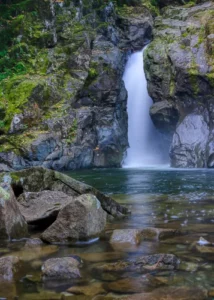
The first time I went to the Medicine Bowls in Courtenay, it felt like a