
Spinning Fire: A Guide to Steel Wool Photography
I think steel wool photography creates some of the most amazing images you can capture
Share the Love This Valentine’s Day – 25% Off


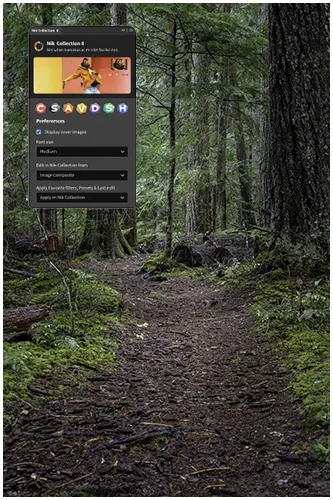

Don’t let your photography fall flat! Just as colour enlivens our world, the right editing tools are essential for impactful images, whether for professional portfolios or personal enjoyment.
What: Nik Collection 8, a powerful suite of photo editing plugins, offers a diverse range of tools designed to elevate your images with stunning effects and unprecedented speed.
Who: Created by DxO, this collection empowers photographers of all levels seeking to enhance their workflow and achieve professional-quality results. Where: Seamlessly integrating with popular platforms like Adobe Lightroom and Photoshop, Nik brings its advanced capabilities directly into your existing editing environment.
Why: By incorporating features like significantly faster image loading (up to 30% quicker), precise U Point™ technology, and innovative polygonal and luminosity masks, Nik streamlines your editing process, allowing for more creative exploration with less stress and ultimately making your photography smoother and more visually captivating.
Curious about Collection 8? See how it can make your photography smoother and more beautiful. Ready to start? Check out the nik collection 8 free download and explore nik collection 8 tutorials to begin your creative journey.
The Nik Collection is more than just photo editing tools. It’s designed to make your images stand out with precision and style. This version is packed with features to make editing easier and more enjoyable.
It doesn’t just improve on the old – it also speeds up your workflow and adds new selection tricks. Here’s what you’ll find in Nik Collection 8:
| Features | What is Does |
|---|---|
| U-point upgrades | Fresh local adjustment tools like a polygon tool and light masks for sharper selections. |
| Faster start | Images open up lightning quick – 20-30% faster than before. |
| Quick tool search. | Makes finding filters and presets a snap. |
| U-point tweaks | Now, Control Points stretch into ellipses and work even better. |
Nik Collection 8 is a big leap forward in saving time. The Quick Search feature is like having a personal assistant. It makes finding filters and presets easy. U Point’s update lets you adjust images like a pro.
For those looking to improve, DXO tutorials offer tips and tricks. Whether you’re a beginner or advanced, Nik Collection has everything you need to enhance your photography.
Send you edits directly as a new layer to Photoshop while you continue working. Yes! you can do this multiple times.

Looking to stretch your budget? We’ve got good news! Use the SPECIAL code whosaid15 for an extra 5% off
The Nik Collection 8 has many powerful tools to improve your photo editing. Each plugin is designed for specific tasks, making it a solid choice for budding photographers and pros. Here are some of the top features.
Nik colour Efex is loved by many for its wide range of filters and presets. It’s great for adjusting colours in your photos. The latest update includes an improved HSL filter.
You can also mix ClearView, Grain, and HSL filters for those creative effects. Nik Viveza is now built-in, adding to your colour-tuning tools.
My god man Nothing beats Nik Silver Efex it’s perfect for creating stunning black-and-white photos. It offers a wide range of presets that mimic classic film styles. You can also adjust contrast, brightness, and tonality to achieve dramatic monochrome looks with ease.
Viveza is part of the Nik Collection 8, showcasing U Point™ technology. This tech lets you adjust colours and tones easily, without using masks or selections. With tools like Selective Tones and Luminosity Masks, you can fine-tune highlights, shadows, and more, for any photo.
Unlock these tools to enhance your photos and streamline your editing process. Nik Collection helps you easily adjust colors, create beautiful black-and-white images, and make selective edits.
...Bob
Nik Collection should be your go-to toolbox, working seamlessly with top photo editing apps. Enhance your photos using your favourite software with the powerful tools in the collection. Here’s how to use them with Adobe Lightroom, Photoshop, and Affinity Photo.
Let’s start enhancing your photos in Adobe Lightroom with Nik by DXO:
Bam! You’re adding Nik Collection magic right into your Lightroom mojo.
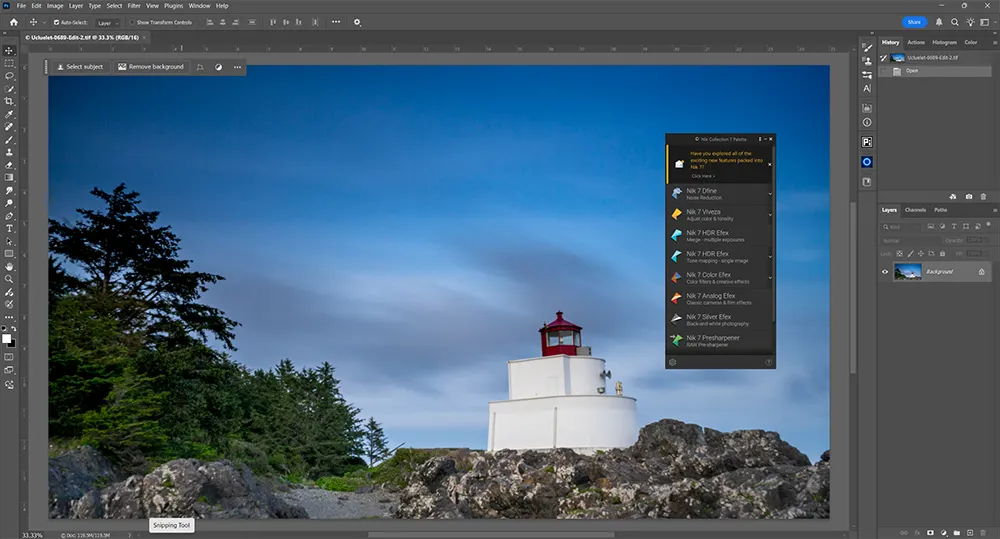
Photoshop users, here’s how to supercharge your creativity with the Nik Collection:
It’s as simple as that to sprinkle some artistic flair and detailed tweaks with Photoshop.
Yes, Nik by DXO plays well with others, including Affinity Photo. Here’s how:
And you’re done! Plus, Nik Collection is ready to roll with apps like Capture One and DxO PhotoLab, so regardless of your go-to editor, these tools are at your fingertips.
Knowing how to use Nik plugins with these popular apps means a smoother, more artistic post-production workflow.
Nik is a big help for new photographers in post-production. It offers many benefits that can really improve your editing skills.
It’s easy to use, even for beginners. It’s designed to be simple for everyone, not just experts. You can start using the tools and plugins right away without getting lost.
The layout is also easy to navigate. Finding the right adjustments and filters won’t be a problem. Whether you’re adjusting colours or enhancing images, the design makes it easy and stress-free.
Not sure if you should buy new software? Nik Collection 8 offers a free download. This lets you try it out without spending money. It’s like a test drive for your editing skills.
Use the code whosaid15, you’ll get an extra 15 % off.
Nik comes with great resources for beginners. They have tutorials that explain each plugin and share tips. These guides are perfect for those new to the software, helping you get the most out of it.
With these benefits, beginners can confidently start editing their photos.
Getting amazing effects is easy. Here’s a look at three great filters: HDR Efex, Analog Efex, and Nik Sharpener.
HDR Efex enhances your photos by adding a full range of light and shadow. By combines multiple photos into a perfectly exposed one. HDR Efex allows you to adjust settings and try different presets to boost your photos.
Use HDR Efex as a standalone plugin or integrate it with other apps. It makes getting dramatic high-dynamic-range shots easy and friendly to use.
Analog Efex lets you add a nostalgic touch to your photos. It’s great for creating a cozy, old-school feel. You can play with film styles, lens effects, and textures to get that vintage vibe.
Nik Analog Efex does the trick with:
It’s all about being creative with easy tweaks. Need a hand starting out? Check out their Nik Collection 8 tutorials.
The Nik Sharpener is your go-to for making details pop. It’s perfect for both printing and online use, ensuring your images are sharp and visually appealing.
With Nik Sharpener, choose settings for your desired output:
Dfine eliminates noise while preserving detail, making it essential for low-light photography and high-ISO shots. Its intelligent algorithms analyze and reduce grain without sacrificing sharpness.
Whether you’re shooting in dim lighting or recovering old scans, Dfine ensures clean, professional-quality results.
Ready to boost your photography skills? Nik Collection 8 is here to help. It makes your editing work faster, with file handling up to 30% quicker. You’ll enjoy quick exports and fast searches, making your day easier (Nik Collection by DxO).
Imagine having U Point technology and powerful filters at your fingertips. These tools give you precise control and endless creative fun with your photos.
With advanced selection tools, detailed edits are a breeze. Free tutorials and a free download make it easy to learn. Whether you’re new to editing or a pro, Nik Collection 8 has everything you need.

Nik Collection is a suite of powerful photo editing plugins used to enhance images with creative filters, precise adjustments, black and white conversions, HDR effects, noise reduction, and sharpening, integrating seamlessly with software like Photoshop and Lightroom.
Initially developed by Nik Software, the Nik Collection was acquired by Google in 2012 and made free in 2016. Google discontinued development in 2017, but DxO Labs acquired it and has continued to update and sell the plugin suite
I think steel wool photography creates some of the most amazing images you can capture

Long exposure photography is a technique that uses slow shutter speeds to capture silky smooth

The first time I went to the Medicine Bowls in Courtenay, it felt like a