Grand Opening & Black Friday Sale  =  50% Off 

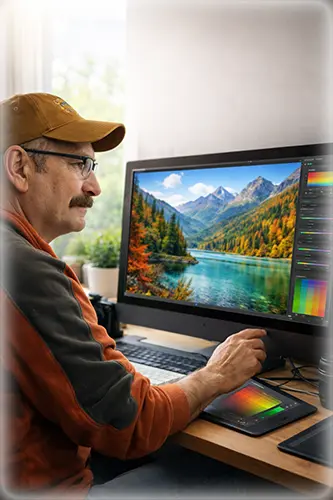
Image of an old man working on his computer, representing how aging eyes affect colour perceptions
Down Arrow

How Aging Eyes Affect Colour Perception in Photography After 50

As we get older, our colour vision changes, and the result affects our life, including photography. Our eyes and brains work together to turn light into colour, but this process becomes less precise with age. Research shows that older adults often struggle to see certain colours, especially blues and subtle tones. Colours can appear less vibrant, which can affect how we as photographers see, edit, and capture colour in our photos.

These changes happen slowly and are easy to miss. The camera still works. The monitor still looks fine. Yet the final image may not appear the same to other people. Understanding how aging eyes affect colour perception helps us as photographers to edit more confidently and consistently. It does not limit creativity. It adds awareness.

Key Takeaways

  • Eyes change naturally with age
  • Blue colour sensitivity declines first
  • Oversaturation is a common editing issue.
  • Monitor calibration cannot fix perception
  • Short editing sessions improve accuracy.
  • Reference images help balance colour.
  • Check edits on multiple screens
  • Light and contrast matter most.

Table of Contents

What Changes in the Eyes as We Age

As we get older, several parts of the eye change. These changes affect how colour and brightness are seen.

The clear lens inside the eye thickens over time. It also becomes slightly yellow. This filters the light before it reaches the retina. Blue light is affected the most, which changes how cool colours appear.

The pupil also becomes smaller. Less light enters the eye. This can make images look darker and flatter than they really are.

The retina becomes less sensitive to contrast. Fine colour differences are harder to detect. Shadows can lose detail. Highlights may feel harsh.

These changes often begin in the 40s and become more noticeable after 50. They are a normal part of aging and do not mean your eyesight is failing.

Why Colour Perception Matters in Photography

Colour plays a large role in photography. It sets mood, suggests time of day, and guides the viewer’s eye. When colour perception shifts, editing decisions shift as well.

The most common issue for aging photographers is oversaturation. Because colours appear less intense, photographers often increase saturation without realizing it. On their own screen, the image looks balanced. On other screens, it can look too strong.

Blues, teals, and purples are often pushed the most. Skies may look heavy. Water can feel unnatural. Forest greens may lose depth.

This does not happen all at once. It builds slowly, which makes it harder to notice.

Why Monitor Calibration Is Not Enough

Many photographers calibrate their monitors and assume colour issues are solved. Calibration is important. It ensures the monitor displays colour accurately.

However, calibration cannot correct how your eyes interpret colour. Two people can look at the same calibrated screen and see different things.

If your eyes filter blue light more than they used to, a calibrated monitor will still appear warmer to you. You may add more blue to compensate.

Calibration supports accuracy, but it does not replace awareness.

Looking to stretch your budget? We’ve got good news! Use the  SPECIAL code  whosaid15 for an extra 5% off

The Brain’s Role in Colour Judgment

The brain adapts to what it sees. This helps us function in different lighting conditions. In photo editing, this adaptation can cause problems.

During long editing sessions, your eyes and brain adjust to strong colours. What looked bold at first can start to look normal. This makes it easy to keep pushing colour without noticing.

As colour sensitivity declines with age, this effect becomes stronger.

Common Editing Mistakes Linked to Aging Eyes

Many photographers over 50 notice patterns in their edits once they look closely. These patterns are not about skill. They are about perception.

Common issues include overly saturated skies, strong teal or aqua tones, heavy greens in forest scenes, warm skin tones pushed too far, and loss of subtle colour transitions.

These images often look fine to the photographer but appear intense to others.

How Aging Eyes Affect Editing Decisions

Age-Related Vision ChangeWhat the Photographer SeesCommon Editing ResponseBetter Editing Habit
Lens yellowingColours look mutedIncrease saturationLower saturation slightly
Reduced blue sensitivitySkies look dullPush blues and tealsUse reference images
Lower contrast sensitivityImage feels flatAdd heavy contrastAdjust contrast slowly
Smaller pupil sizeImage looks darkBrighten midtonesCheck histogram balance
Visual fatigueColours feel normalKeep pushing editsTake editing breaks
Neural colour declineSubtle tones vanishOver-edit huesFocus on light first

Aging eyes are not a limitation in photography. They are a reminder to slow down, check your work, and trust the process

Simple Editing Habits That Help

You do not need to change your style or tools. A few small habits can improve colour balance.

Lower saturation as a final check. After editing, reduce global saturation slightly. If the image still works, your original edit was likely too strong.

Edit in short sessions. Limit sessions to 30 or 45 minutes. Step away and return later. Fresh eyes reveal issues quickly.

Use trusted reference images. Compare your work to images you trust. This gives your eyes a neutral point.

Check on multiple screens. View your image on a phone or tablet. Differences become obvious.

Focus on Light Before Colour

Strong photos depend on light, contrast, and structure. Colour should support these elements.

Start by adjusting exposure and tone. Make sure the image works in black and white. Once the structure is solid, add colour with care.

This approach reduces the urge to rely on saturation.

Using Tools to Support Your Eyes

Editing tools can help confirm what your eyes may miss. Histograms show tonal balance without relying on colour perception.

Selective colour adjustments are safer than global changes. Adjust specific hues instead of everything at once.

Be careful with presets. Many are designed for impact, not accuracy. Use them as a starting point, not a final look.

Understanding Viewer Perception

Your audience includes people of many ages. Younger viewers often see colour more strongly. What feels balanced to you may feel intense to them.

Editing with this in mind helps your images connect with more people. It does not mean editing for others. It means being aware of differences.

Bob Wild Fine Art

Featured Gallery

Etosha National Park Giraffes

Starting at CA$39.00

Vancouver Island Waterfall Print

Starting at CA$39.00

Lower Myra Falls Vancouver Island

Starting at CA$39.00

Red Barn Building Farmers Field

Starting at CA$39.00

Experience Still Matters

Aging eyes do not make you a worse photographer. Experience often improves patience, composition, and storytelling.

Many photographers create their best work later in life. Awareness of colour perception helps protect that progress.

Eye Health and Editing Comfort

Regular eye exams help maintain comfort and clarity. Updated prescriptions reduce strain.

Good workspace lighting matters. Avoid strong colour casts in room lighting. Neutral light supports better editing decisions.

If you use reading glasses, consider a pair designed for screen distance.

Accepting Change Without Losing Joy

Photography should remain enjoyable. Awareness of colour perception is a tool, not a limitation.

Natural colour ages well. It holds up across screens and time. Small adjustments help your work stay honest.

Final Thoughts

Aging eyes are part of life. They change slowly and quietly. In photography, these changes affect colour perception, not creativity.

With awareness and a few simple habits, you can keep editing with confidence. Your experience and love for photography matter more than ever.

Your eyes may change. Your vision as a photographer does not.

Frequently Asked Questions

Yes. As eyes age, their colour sensitivity decreases, especially in blues and cool tones. This makes colours appear less vibrant, and it can affect how photographers judge saturation and colour balance when editing photos.

Older photographers may oversaturate images because colours appear muted in aging eyes. Increasing saturation makes the image look correct to them, but it can appear too strong to others viewing the photo.

No. Monitor calibration ensures accurate colour displays, but it cannot change how eyes perceive colour. Aging photographers should also use reference images and view edits on multiple screens to maintain balance.

Our Latest Blogs