Grand Opening & Black Friday Sale  =  50% Off 

Nik Sharpener by DXO is a software tool designed to enhance image sharpness and detail.
Down Arrow

Nik Collection: Image Sharpening with Nik Sharpener Pro

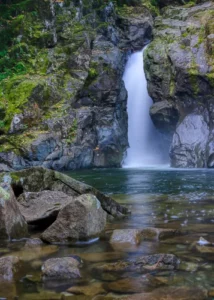
I once spent several hours trying to perfect one of my waterfall photos. But, no matter how I adjusted it, something was off with the raw file before applying sharpening.

That’s when I tried Nik Sharpener Pro. With a few simple clicks, my photo went from dull and flat to highly detailed, applying sharpening to enhance the output quality. The sharpness made the rocks’ textures and stars ‘stand out. It was a photo I was happy with, especially after applying local adjustments for better detail.

If you’ve encountered a similar problem with your photos, well, I might have a solution. We’re going to dive into this amazing tool for sharpening images in digital photography.

Key Takeaways

  • Sharpening can elevate your images from ordinary to stunning with minimal effort.
  • Understanding different sharpening techniques is essential for achieving optimal results.
  • Using Nik Sharpener Pro allows for precise, detail-rich output sharpening tailored to your needs.
  • A step-by-step approach with tips can help you avoid common pitfalls while sharpening.
  • Choosing the right settings for print and display is crucial for successful image rendering.

Table of Contents

Introduction to Nik Sharpener 

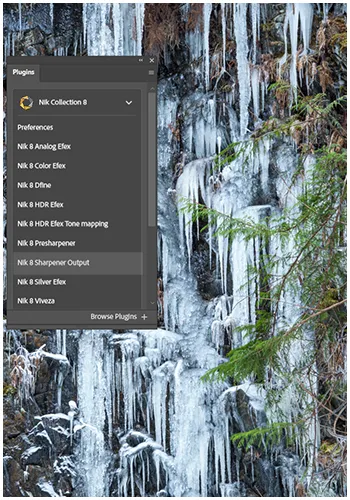
Getting the right sharpening tools can change your photography. Nik Sharpener Pro, which is part of the Nik Collection by DXO, is one of my top picks for image processing. It helps photographers, from hobbyists to pros, obtain stunning sharpness in their photos.

What is Nik Sharpener Pro?

Did you know it’s a tool designed specifically for sharpening your photos? It has an easy-to-use interface, and you can fine-tune your images’ sharpness with two main modules: Nik Presharpener and Nik Sharpener Output.

Key Features

  • Two essential modules for both pre- and output sharpening.
  • Customizable settings tailored to your specific needs.
  • User-friendly interface, perfect for artists at any skill level.
  • Advanced algorithms that enhance detail without introducing digital noise.
  • Support for various formats ensuring flexibility in your workflow.

Understanding the Importance of Sharpening

Sharpening a photo is one of those things that seems small but can make a big difference in your photo. I always do it as one of the last steps, especially after editing or resizing, images can lose a bit of clarity along the way.

This is where Nik Sharpener Pro, is super handy and lets me fine-tune things without making the photo look overdone. What I really like is that I can:

It’s like giving the photo that final polish so everything looks clean and intentional.

Looking to stretch your budget? We’ve got good news! Use the  SPECIAL code  whosaid15 for an extra 5% off

Types of Sharpening Techniques

Understanding different sharpening techniques can help improve your photography. Each method has its own purpose. Let’s explore some key techniques.

Output Sharpening Explained

Output sharpening is crucial for preparing images for display. It counteracts dot gain, where ink spreads when printed, ensuring that the captured image maintains its sharpness. With the right settings and adaptive sharpening, your images will stay sharp and look excellent on any paper type.

Pre-Sharpening for Optimal Results

Pre-sharpening is applied during editing stage. It gives your images a clean start before final sharpening. This step prepares your photos for more precise adjustments later. It’s great for selectively sharpening, enhancing textures and contrasts.

Detail Enhancement Techniques

Detail enhancement techniques work well with sharpening. They significantly improve your images’ sharpness and quality, especially when using an output sharpener. Using these tools with sharpening creates stunning visuals that grab viewers’ attention.

Using Sharpener Effectively

It’s all about following a simple plan to apply sharpening effectively to your images. First, open your favourite editing software, whether it’s Adobe Lightroom or Photoshop. Then, follow our step-by-step guide to sharpen your images effectively using the slider for precise adjustments.

Step-by-Step Guide to Sharpening Images

Start with a quick pre-sharpening step. This gets your image ready for sharpening. Use Nik Presharpener to enhance details first. Here’s a simple guide to follow:

  1. Load your image into the software.
  2. Apply Presharpener to boost details.
  3. Switch to subsequent output sharpening settings.
  4. Adjust parameters based on your output type, keeping an eye on changes.
  5. Compare before and after adjustments to fine-tune your work.

Tips for Best Practices with the Software

Once you get the hang of the basics, try these best practices:

  • Always zoom in to view the actual effects of sharpening.
  • Experiment with subtle adjustments—too much can lead to artifacts.
  • Utilize the preview feature to evaluate changes dynamically.
  • Understand your output requirements to tailor sharpening settings effectively.

Common Mistakes to Avoid

Sharpening images can be tricky, and avoiding common mistakes while applying sharpening enhances your results.

  • Forgetting to pre-sharpen can diminish image quality.
  • Applying too much sharpening can create unnatural details.
  • Not comparing initial and final images leaves room for oversight.
  • Relying on default settings without adjustments can lead to sub-par outcomes.
A stunning sunset, elevated by the magic of Nik Sharpener Pro.

Sharpening for Different Outputs

 Knowing the difference between print and display sharpening is essential. Each medium, like print or screen, requires a different approach to sharpening. Even the type of paper should influence how much sharpening you apply. This process includes adjusting Nik Sharpener settings and handling contrast.

Sharpening for Print

For print, sharpening is a must, not a choice. Ink dots spread, therefore making your images seem less sharp. So, you need to sharpen more. The type of paper also matters, as it absorbs ink differently. If your not doing your own printing, have a talk to your printer guy. Yes I have a printer guy.

Adjusting Nik Sharpener settings can greatly improve image clarity. Find a balance that keeps detail sharp while compensating for ink spread.

Sharpening for Display

For screens, sharpening is more delicate. Too much can cause unnatural effects, even on high-resolution screens. Since there’s no ink spread, you can sharpen more subtly.

Adjust settings to highlight detail without losing natural textures, especially when working with raw files. Remember, contrast is also crucial for visual impact on screens, particularly when using local adjustments.

Choosing the Right Settings for Your Output

Choosing the right settings is vital. Here’s a table to help you pick the right settings for your needs:

Output MediumSharpening StrengthRecommended settingsPaper Type
PrintHigh-quality output sharpener settings can elevate your images significantly.Focus on Texture and MidtonesGlossy or Matte
DisplayMediumEmphasize Edge ContrastAny Screen Type (LCD, OLED)
WebLow to mediumBalance Detail and SizeN/A

By grasping these differences, you'll sharpen your images perfectly for any platform.

Conclusion

Learning to sharpen with Nik Sharpener Pro opens up a whole new level in your photography. It’s not just about making your images look crisp, it’s about making sure every detail you worked hard to capture gets the attention it deserves.

What I love about this plugin is how it enhances clarity while still keeping everything looking clean and natural. It doesn’t overdo it, which is key. Whether you’re editing landscapes, portraits, or macro shots, Nik Sharpener Pro gives you precise control so you can sharpen exactly where it matters most

Frequently Asked Questions

Why sharpen images? Sharpening images enhances clarity and detail, making photos appear crisper and more professional. It’s crucial for overcoming slight blur from cameras and revealing intricate textures, transforming dull images into stunning, impactful visuals ready for print or display.

To sharpen your images, utilize tools like Nik Sharpener Pro to enhance detail and clarity. This process brings out textures and makes elements “stand out,” transforming dull photos into stunning, detailed visuals, often with just a few clicks

Our Latest Blogs