Grand Opening & Black Friday Sale  =  50% Off 

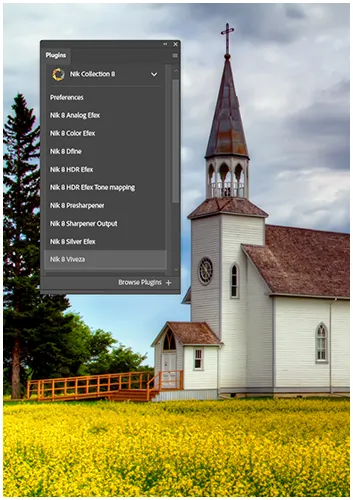
Nik Veveza effortlessly integrates with both Photoshop and Lightroom.
Down Arrow

Nik Viveza: Powerful Photo Edits Made Easy

Are you tired of spending hours on photo edits? Nik Viveza, part of the Nik Collection by DxO , might be what you need. This software offers a unique way to enhance your photos quickly and accurately.

Nik Viveza is a standout tool for image enhancement, particularly with shadow adjustments. It doesn’t use complex masking or layers. It’s perfect for both beginners and experts, thanks to its easy-to-use interface and powerful features. Now, adjusting colour and tonality is faster and easier.

Key Takeaways

  • Viveza offers fast, precise photo edits without complex masking.
  • It’s part of Nik Collection, the biggest update in the suite’s history.
  • New features include improved U-Point™ technology and luminosity masks.
  • Nik Viveza streamlines workflow for both amateur and professional photographers, making it a pro choice.
  • The software allows for intuitive colour and tonality adjustments.
  • A 30-day free trial is available to test the software.

Table of Contents

What is Nik Viveza?

Viveza uses U-Point technology for precise adjustments. It’s easy to use, making it great for both new and seasoned photographers.

Overview of Nik Viveza and its features

It has 13 colour presets for quick creativity and 14 settings for detailed tonal adjustments. Its sliders, levels, and curves make complex tasks simple.

Enhancing your workflow

Faster and easier editing. It works well with other Nik Collection tools. You can use Viveza as a filter in Nik colour Efex, making editing smoother.

It also lets you save and share presets. This helps keep your editing style consistent and makes teamwork easier.

Setting Nik Viveza apart

Control Point technology is what sets it apart. It lets you make local adjustments easily, without the need for complicated masks. The White Balance tool makes quick colour adjustments, and the RGB curve gives you control over brightness and contrast.


Looking to stretch your budget? We’ve got good news! Use the  SPECIAL code  whosaid15 for an extra 5% off

Key adjustments in Nik Viveza

It’s packed with powerful tools for editing your photos, including tonal adjustments. It’s known for its easy-to-use interface and detailed control options. This makes it a great tool for photographers who want to improve their photos.

Global vs Local Adjustments

Nik Viveza lets you make global and local adjustments. Global changes affect the whole photo, while local changes focus on specific parts. You can use sliders, levels, and curves for global edits to tweak your photo’s look.

Control Point Tool for Precise Edits

The control point tool is a key feature for local adjustments in photography. It lets you pick certain areas of your photo for editing. You can shape control points into ellipses and polygons, adjusting their angle for super precise edits.

Contrast and Brightness Adjustments

It’s excellent for adjusting contrast, brightness, and applying special effects. The histogram shows brightness levels across RGB channels, helping you get the right balance. You can tweak dark and light tones to ensure your images look their best.

These tips will help you use Nik Viveza's features to their fullest. They'll improve your photo editing workflow and help you get amazing results with special effects.

How to improve your image editing workflow?

A top-notch photo editing software that excels in photography. It makes your image editing workflow better. This tool has special features that make your work faster and more efficient.

Best practices for using Nik Viveza in your editing process

Start by making and saving presets for common edits. This saves you up to 5 minutes per photo. Learn about Control Points for precise edits without the hassle of masking, perfect for pro photographers.

Incorporating Nik Viveza into your Photoshop routine

Make Viveza a part of your Photoshop workflow. Use it as a Smart Filter for easy adjustments. Apply Viveza for colour and tone before any other effects or retouching.

Tips for achieving a balanced workflow with colour Efex

Here’s how to use Nik Viveza and colour Efex together:

  • First, use Viveza for colour and tone adjustments.
  • Then, add Colour Efex filters for creative effects.
  • Finally, go back to Viveza for any last-minute tweaks.

Remember, you can turn filters on and off in colour Efex to experiment with different modes. By following these steps, you'll make your editing process smoother and improve your photos without losing quality.

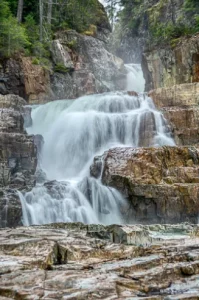
An illustration of how to use Nik Viveza to enhance depth and create a more structured image.

What are the best tools in Nik Viveza?

Viveza has powerful tools to make your photos better. Its U Point™ technology lets you make precise changes easily, without the need for complex masks.

Exploring the filter menu in Nik Viveza

The filter menu is full of great options. It boast having 13 colour presets to get your creative juices flowing with special effects. You can quickly switch between these filters, thanks to the Nik Collection’s improved integration.

The Quick Search feature makes finding the right filter fast. This helps speed up your editing process.

How to select and modify filters using Nik Viveza

Choosing and tweaking filters is easy, especially in pro mode. The plugin’s simple design lets you adjust brightness, contrast, and saturation with just a few clicks. You can also use control points for local edits, like making a flower’s petals pop without changing the leaves.

Using luminosity masks for advanced adjustments

Nik Viveza also has luminosity masks for detailed edits. These masks let you target specific parts of your image for precise changes. With the HSL slider tool, you can fine-tune colours and tones accurately.

This feature is great for creating vibrant, natural-looking images with high dynamic range.

Final Thoughts 

Nik Viveza, part of the Nik Collection by DxO, is a powerful photo editing tool designed to make precise, quick edits without complex masking. Thanks to its user-friendly interface and unique U-PointTM technology, both beginners and professionals can easily adjust colour, tone, contrast, and brightness.

Key features include 13 creative colour presets, detailed tonal adjustment tools, and advanced luminosity masks for targeted edits. The software streamlines workflows by allowing local and global adjustments, saving and sharing presets, and seamless integration with tools like Photoshop and Color Efex.

Overall, Nik Viveza stands out for its precision, ease of use, and ability to deliver high-quality results efficiently, helping photographers transform their images while saving valuable editing time.


Our Latest Blogs